Modification Products Auto sleep function to reduce standby power
-
Is there a good way to reduce standby power for eco-friendly and energy saving?
-
Standby power can be reduced by implementing auto sleep function which detects the standby state and then the operation of the power supply can be automatically stopped.
Auto sleep function
The power supply is consuming power even under no-load condition in order to maintain the output voltage (internal power loss).
The auto-sleep function detects when the power supply enters the standby state. When it continues for a certain period of time, the output is automatically stopped.
Since the power supply determines the standby state and stops the operation by itself, eco-friendly and energy saving can be achieved without (the user of the device) being aware of it.
- 1.The standby state is detected inside the power supply, which triggers the operation to stop.
- 2.When the standby state is detected, the operation of the power supply is stopped after a certain period.
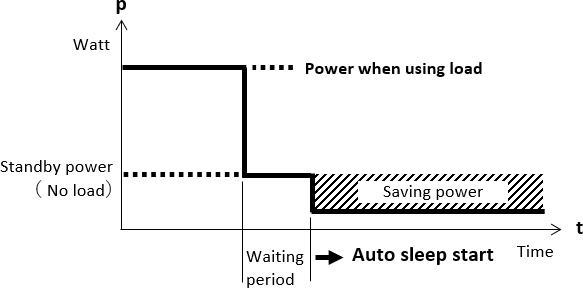
To cancel the auto‑sleep state, either turn off the AC input or apply a signal to the remote‑control terminal.
For details about the load factor and the time setting for shifting to auto‑sleep mode, please contact us.
Application example
- Battery Charger
- Digital signage
- Display lighting etc.
Other examles
- Reduce a high abnormal current.
- Auto shift of overcurrent protection (OCP) point level
- Identify the conditions that caused the power supply to stop.
- Alarm identification function
Examples of power supplies that can be modified
PCA600FWith modifications, various functions can be added.